Get the video from people who never reply.
Customers, executives, and partners say yes, then go quiet. CapSend sends them a link with your brand and your script, follows up for you, and shows you who has recorded.
Customer stories: spring launch
12 people · Due Fri
- Dana Whitfield Dana Whitfield Sent a video
- Luis Ortega Luis Ortega Recording now
- Priya Nair Priya Nair Reminder goes out Wed Opened
- Ken Ito Ken Ito Reminder goes out Wed Not opened
Recording takes two minutes. Getting it takes two weeks.
The customer story, the launch quote from your CEO, the partner shout-out: they all stall in the same three places.
- The follow-up
- They said yes on the call. Three emails and a Slack message later, you still don’t know if they’ve even opened the link.
- The blank page
- Without a script, a one-minute testimonial turns into six minutes of “so, where do I start?”, and someone has to cut it down.
- The phone
- It comes back sideways, backlit, or recorded inside an app that couldn’t open your link, then it’s too big to email.
Follow-up that sends itself.
Set a due date and CapSend reminds everyone who hasn’t sent a video. You see who opened the link, who is recording right now, and who is done, without asking anyone.

- Automatic reminders
- Two days before the due date and on the day, only to people who haven’t sent a video. Turn them off per request.
- Nudge the rest
- One button reminds everyone who hasn’t sent a video. Nobody gets more than one reminder a day.
- Email or text
- Executives often answer texts faster. Texts name you and your company, and never go beyond the invite and two reminders.
- Opens that mean something
- A link counts as opened when a person opens it in a browser. Email security scanners and link previews don’t count.
- A heads-up for you
- You get an email the day before a request is due, with who’s missing, and another if it’s overdue.
- Their channel, your words
- Copy a ready-to-paste invite for Slack, Teams, or a text, with their personal link in it.
Give them the words.
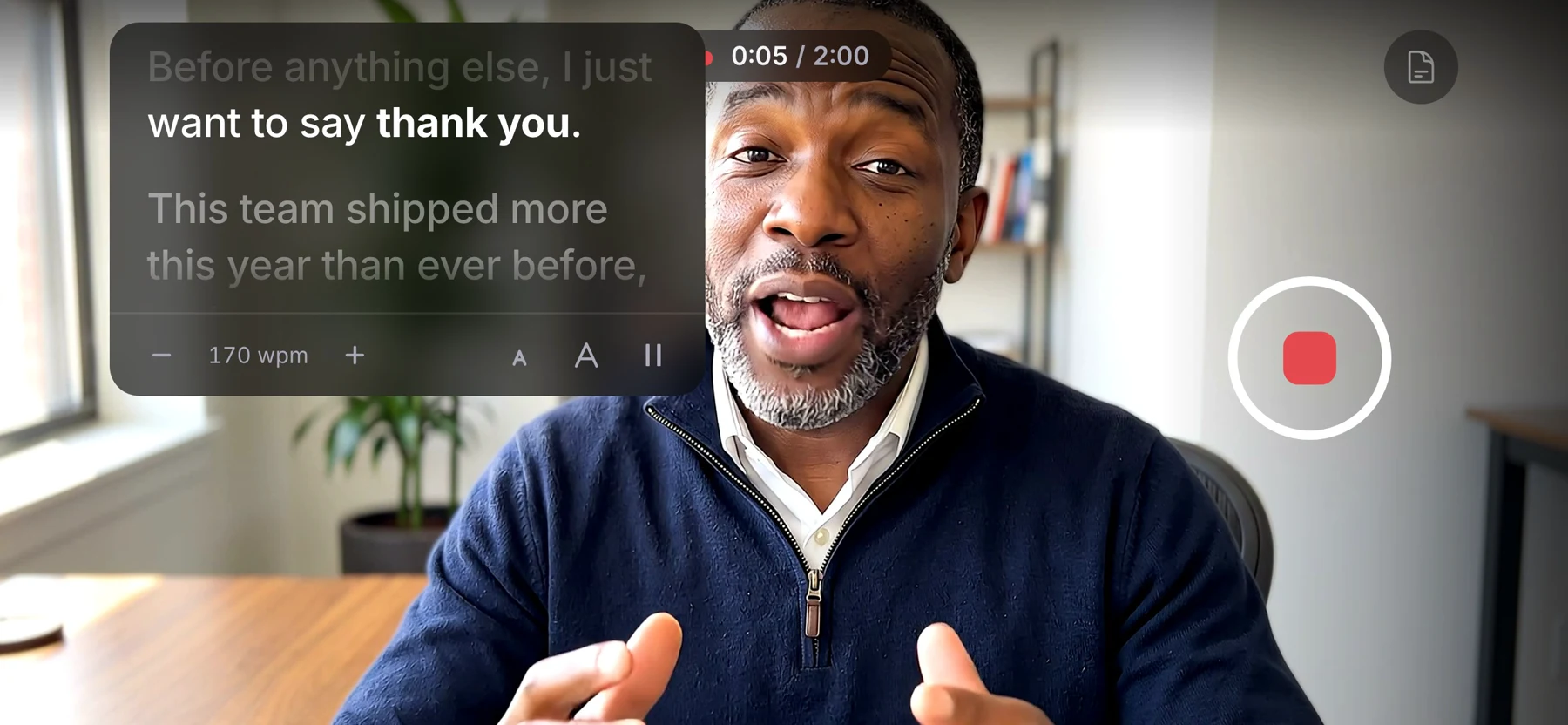
Paste your script and it scrolls beside the camera while they record, so they look at the lens instead of their notes. It never shows up in the video.
- Read time as you write
- See roughly how long the script takes to say, and a warning if it runs past your time limit.
- Their pace, not yours
- They can slow it down, speed it up, make the text bigger, or pause it.
- Room to breathe
- Type [pause] where you want a beat, and it shows as a pause mark.
- Or just talking points
- Show the script before recording only, and let them say it in their own words.
Made for people who don’t make videos.
Most of the people you ask have never recorded anything for a company. CapSend walks them through the parts they’d otherwise get wrong, on their own phone.

- One tap to start No app to install and no account to make. The link opens in Safari or Chrome and they record there.
- Turn your phone If you asked for landscape, CapSend asks them to turn the phone sideways and waits until they do.
- Light and sound checks Before they start, they’ll see “It’s a bit dark” or “We can’t hear you” if something’s off.
- Tips that fit Face a window, wipe the lens, prop the phone at eye level, about an arm’s length away.
- Watch it, then send it They play it back and can try again as many times as they like before they press Send my video.
- Nothing lost on a bad signal The recording stays on their phone until it’s sent. If the connection drops, it picks up where it left off.
- Rescued from in-app browsers If the link opens inside Outlook, Teams, or LinkedIn, they’re shown how to open it in their browser.
- On a laptop? A QR code moves them to their phone, which usually has the better camera.
It comes from you, not from a tool.
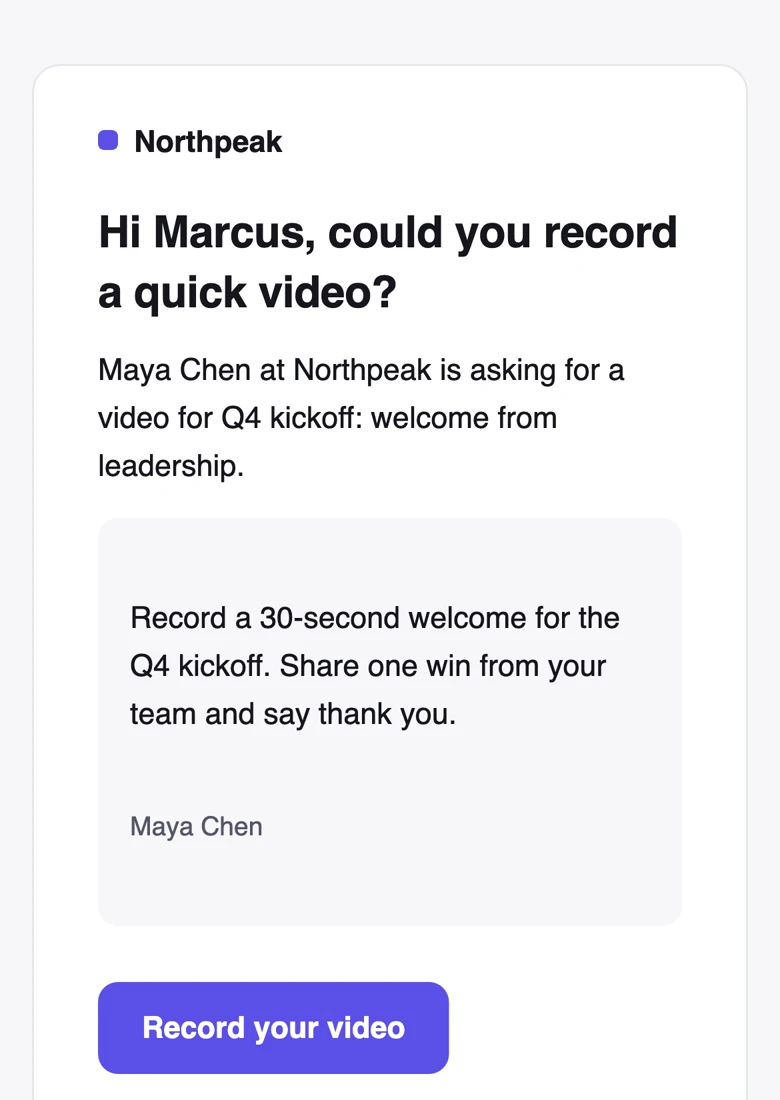
People open messages from someone they know. Invitations, reminders, and the recording page carry your organization’s name, logo, and brand color.
- Emails carry the name of the person asking, and replies go straight to them.
- Links pasted into Slack, Teams, or iMessage preview with your organization’s name.
- The recording page opens with your logo, your instructions, and your due date.
One ask, forty people.
A customer-story push or a round of regional greetings is one request with one set of instructions. Everyone still gets their own private link.
- 1 Write the ask once Title, instructions, a script, and a due date. Start from a template if you ran the same ask last quarter.
- 2 Add the people Type names, paste a list straight from a spreadsheet, or import a CSV. Duplicates are merged.
- 3 Send it By email, text, or both. Or copy each person’s link and send it however you like.
- 4 Watch it fill in Statuses update live. Reminders go out on schedule, and you can nudge the rest whenever you want.
- 5 Approve, retake, share Approve the good ones, ask for a retake with a note, and send the set to your editor.
Running a B2B customer story program? There’s a page for that: champions, interview questions, release consent, and up to 4K originals for the case study. CapSend for customer marketing
CapSend for other teams
- CapSend for video editors Original files, edit-ready copies, and one link for the set
- CapSend for customer marketing Customer stories and testimonials from busy B2B champions
- CapSend for customer support Testimonials and problem reports, recorded by customers
- CapSend for agencies Testimonials from your clients’ customers, ready for the edit
How CapSend compares
What you get from CapSend compared with the ways people send video now.
Ask once. CapSend does the follow-up.
Create a request, add the people, and watch the videos come in.