Customer story videos from your busiest champions.
Your champions love the product and have no time. Send them a branded link, put your questions beside the lens, and let CapSend follow up until the footage is in.
Q3 customer stories
6 champions · Due Thu
- Maya Castillo Maya Castillo VP Revenue Ops, Lumen Freight Sent a video
- Andre Kowalski Andre Kowalski Head of Support, Brightline Recording now
- Hana Sato Hana Sato Director of IT, Corva Health Opened
- Tom Reyes Tom Reyes CFO, Pinecrest Labs Reminder Tue
The champion said yes on the QBR. Then their calendar won.
A case study shoot needs a crew, a date, and a customer with a free afternoon. Remote recording drops the crew, and runs into three new problems.
- The scheduling
- Your CSM books a recording call, it gets moved twice, and the launch the story was for ships without it.
- The rambling
- Without your questions in front of them, a two-minute story becomes eight minutes of context and someone has to cut it.
- The file
- What comes back is a compressed clip from a meeting recording or a messaging app, nowhere near good enough for the website.
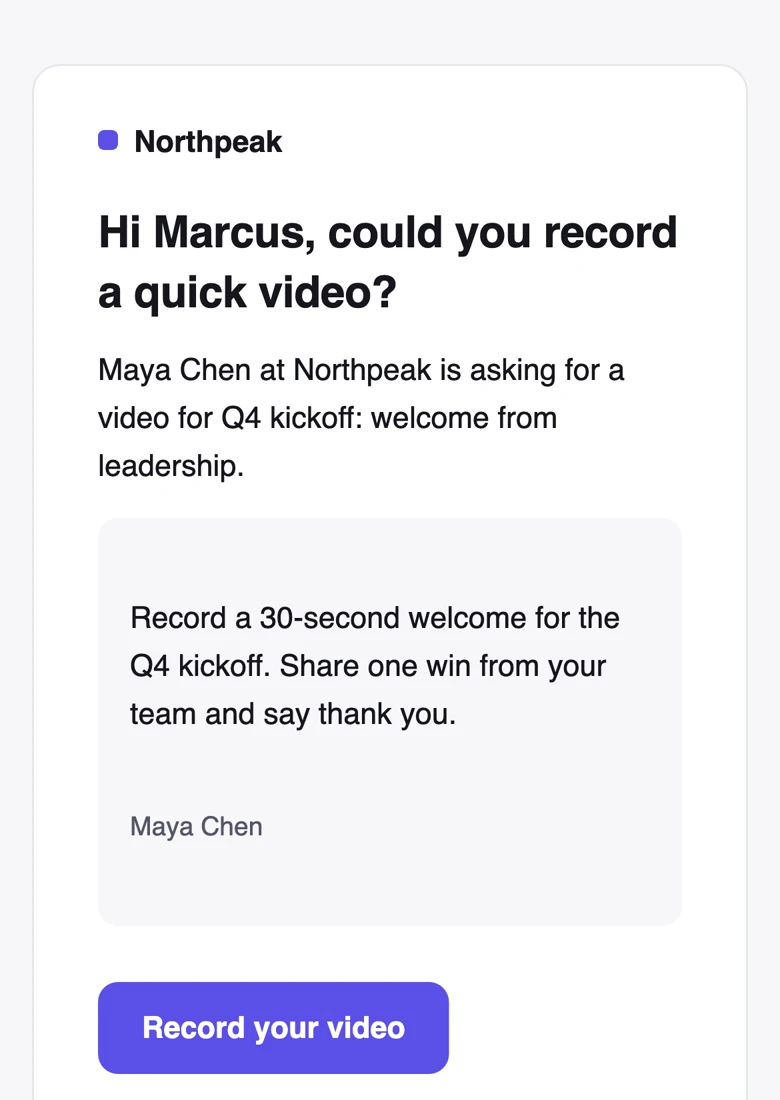
An ask they can fit between meetings.
Each champion gets a private link from you, with your logo and brand color. They record on their phone or laptop whenever they have ten minutes, without booking a call.
- No app to install and no account to make. The link opens in their browser.
- Emails carry the name of the person asking, so it comes from their CSM or from you.
- Copy a ready-to-paste invite for Slack, Teams, or a text if that’s where you talk.
- They watch it back and can try again as many times as they like before sending.
Your interview questions, beside the lens.
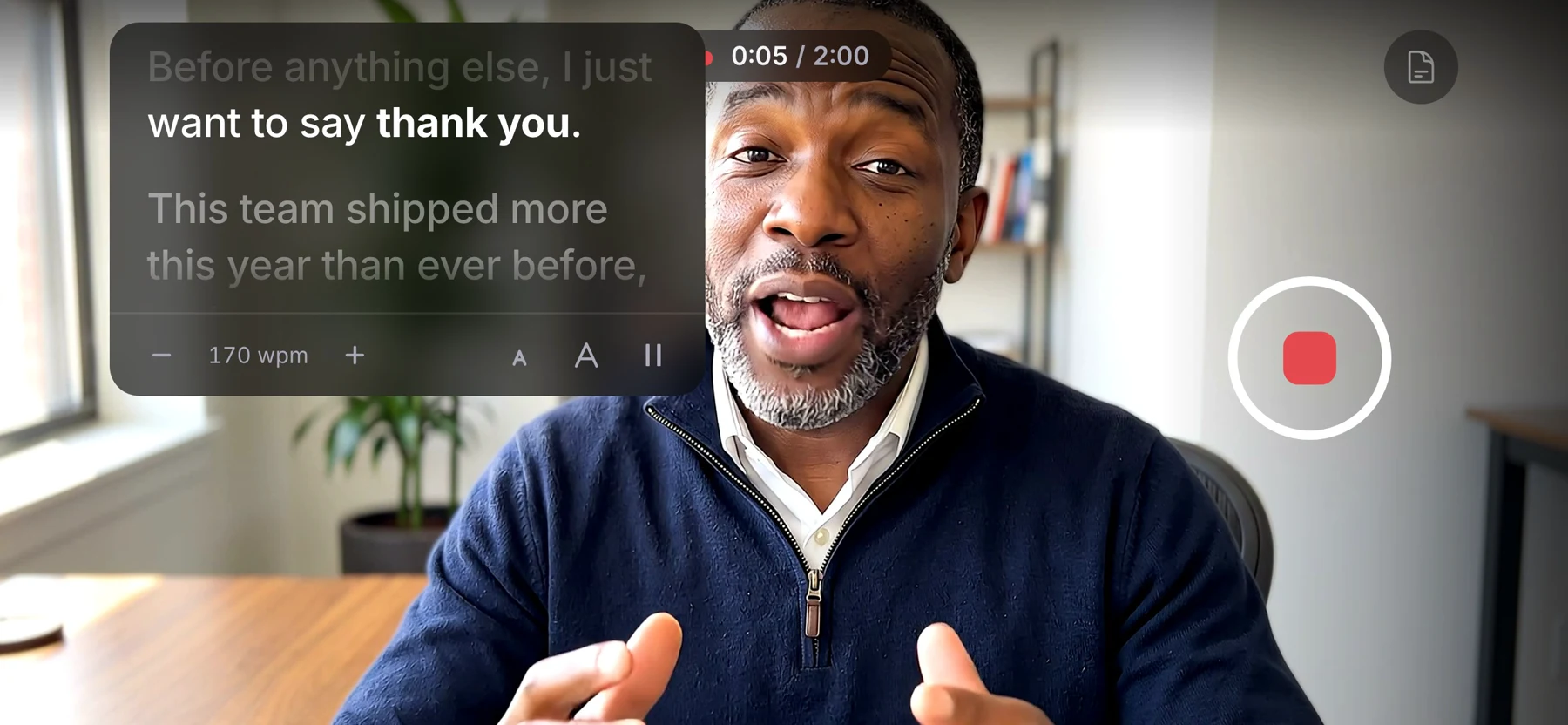
Write the questions you’d ask on a case study call. They scroll beside the camera while your champion records, so they answer to the lens instead of reading their notes.
- Before, after, and the number
- Ask what it was like before, what changed, and the result they’d tell a peer. The story your sales team needs.
- Talking points, not lines
- Show the questions before recording only, and let them answer in their own words.
- Read time as you write
- See roughly how long the script takes to say, and a warning if it runs past your time limit.
- Their pace
- They can slow it down, speed it up, make the text bigger, or pause it.
Follow up without spending goodwill.
Set a due date and CapSend reminds the champions who haven’t sent a video. You don’t have to ask the account team to chase their best customers.

- Automatic reminders
- Two days before the due date and on the day, only to people who haven’t sent a video.
- Nudge the rest
- One button reminds everyone who’s still missing. Nobody gets more than one reminder a day.
- Opens that mean something
- A link counts as opened when a person opens it in a browser. Email security scanners and link previews don’t count.
Permission to publish, saved with the video.
Legal will ask whether you can use it. Turn on “Ask for consent” and write your release. They check the box before sending, and the wording they agreed to stays with their video.
- Link your privacy policy, and it shows on every recording page.
- Delete videos automatically 30 days, 90 days, 1 year, or 2 years after a request closes, or keep them.
- A personal link stops working when you remove that person or close the request.
Up to 4K originals for your editor.
You get the untouched file from their camera, at the resolution it recorded, plus an H.264 MP4 at a constant frame rate that drops straight onto a timeline.

- Ask for landscape, so the clip fits a case study page or a webinar cut.
- Approve the good takes, and ask for a retake with a note when you need one more answer.
- Share the whole set with your editor or agency as one download link.
- On Team, new videos post to Slack or Microsoft Teams, so the account team sees them land.
From “happy to help” to the case study page.
Your CSMs name the champions. You run the rest.
- 1 Write the ask once Instructions, your interview questions, a consent text, and a due date. Start from a template next quarter.
- 2 Add the champions Paste a list from a spreadsheet or import a CSV. Duplicates are merged.
- 3 Send it By email, text, or both. Or copy each person’s link and let their CSM send it.
- 4 Let reminders run Watch statuses update live, and nudge the rest whenever you want.
- 5 Approve and hand off Pick the good takes, ask for a retake if you need one, and send the set to your editor.
What CapSend doesn’t do
Captions, a review widget, or a testimonial wall for your website. CapSend gets you the footage; your editor and your site do the rest. If you need a wall of short clips, a testimonial tool may fit better. See how they compare
Videos from your own executives?
Launch quotes from your CEO, regional greetings, and partner shout-outs use the same requests, reminders, and script. CapSend for marketing teams
CapSend for other teams
- CapSend for video editors Original files, edit-ready copies, and one link for the set
- CapSend for marketing teams Scripts, reminders, and tracking for videos from busy people
- CapSend for customer support Testimonials and problem reports, recorded by customers
- CapSend for agencies Testimonials from your clients’ customers, ready for the edit
How CapSend compares
What you get from CapSend compared with the ways people send video now.
Your next customer story, without the shoot.
Start a 14-day trial, add three champions, and send the first link today.