Collect video testimonials for your agency’s clients.
Send your client’s customers a link. They record on their phone with a script beside the lens, CapSend follows up with the ones who haven’t, and your editor gets the originals.
Requests
-
Harbor Dental: Patient stories 8 people · Due Fri 6 of 8 in
-
Ridgeline Outfitters: Gear reviews 10 people · Due Mar 14 3 of 10 in
-
Fernway Software: Customer case study 4 people · Due Mar 21 1 of 4 in
You can’t send a crew to every happy customer.
Remote testimonials are cheaper to make, but the person recording is two steps away from you: they’re your client’s customer, and they’ve never heard of your agency.
- The cold ask
- A stranger gets a link from a company they don’t recognize, asking them to install an app. Most don’t.
- The chasing
- Your client said their customers would love to help. Two weeks later you’re still waiting, and the edit is booked.
- The footage
- What does come back is a compressed clip from a messaging app, variable frame rate, sideways.
A separate request for each client project.
Each project gets its own instructions, script, due date, and list of people, and every person gets their own private link. You see who opened it, who’s recording, and who’s done, without emailing your client to ask.

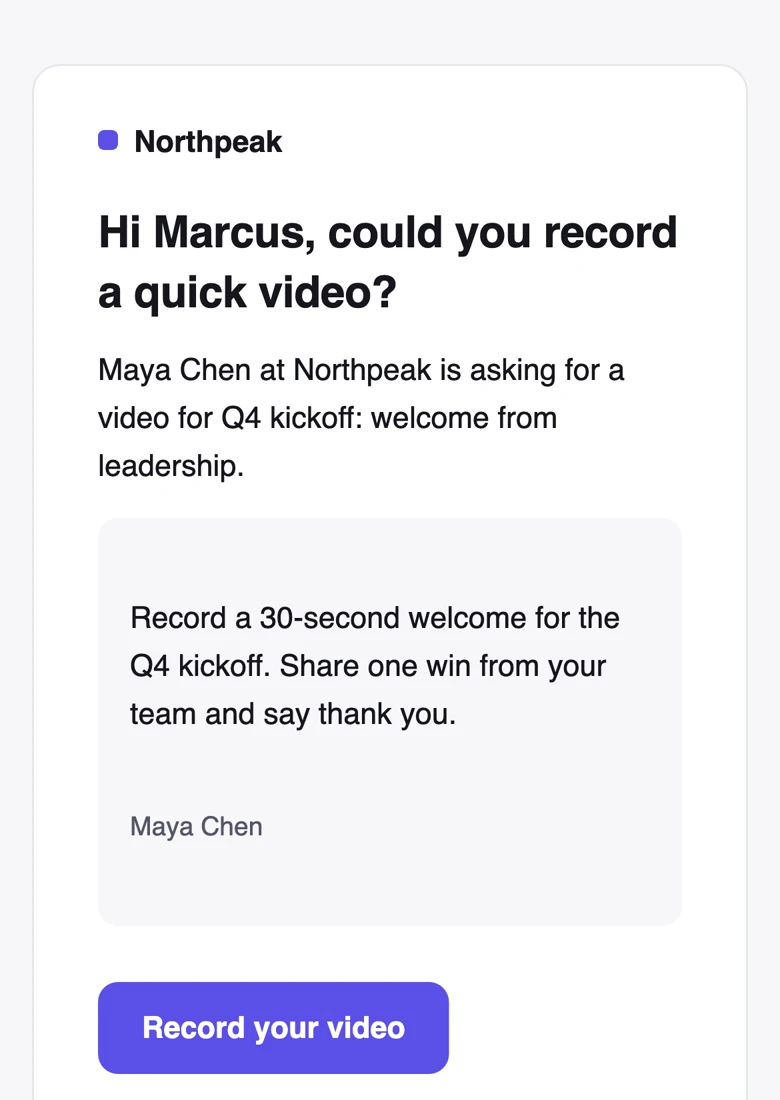
Help your client’s customers trust the link.
Recording pages, invitations, and reminders carry your agency’s name, logo, and brand color. Name your client in the instructions so people know who they’re recording for.
- No app to install and no account to make. The link opens in their browser.
- Turn on “Ask for consent”, and the wording they agreed to is saved with their video.
- Team removes the CapSend badge from the recording page.
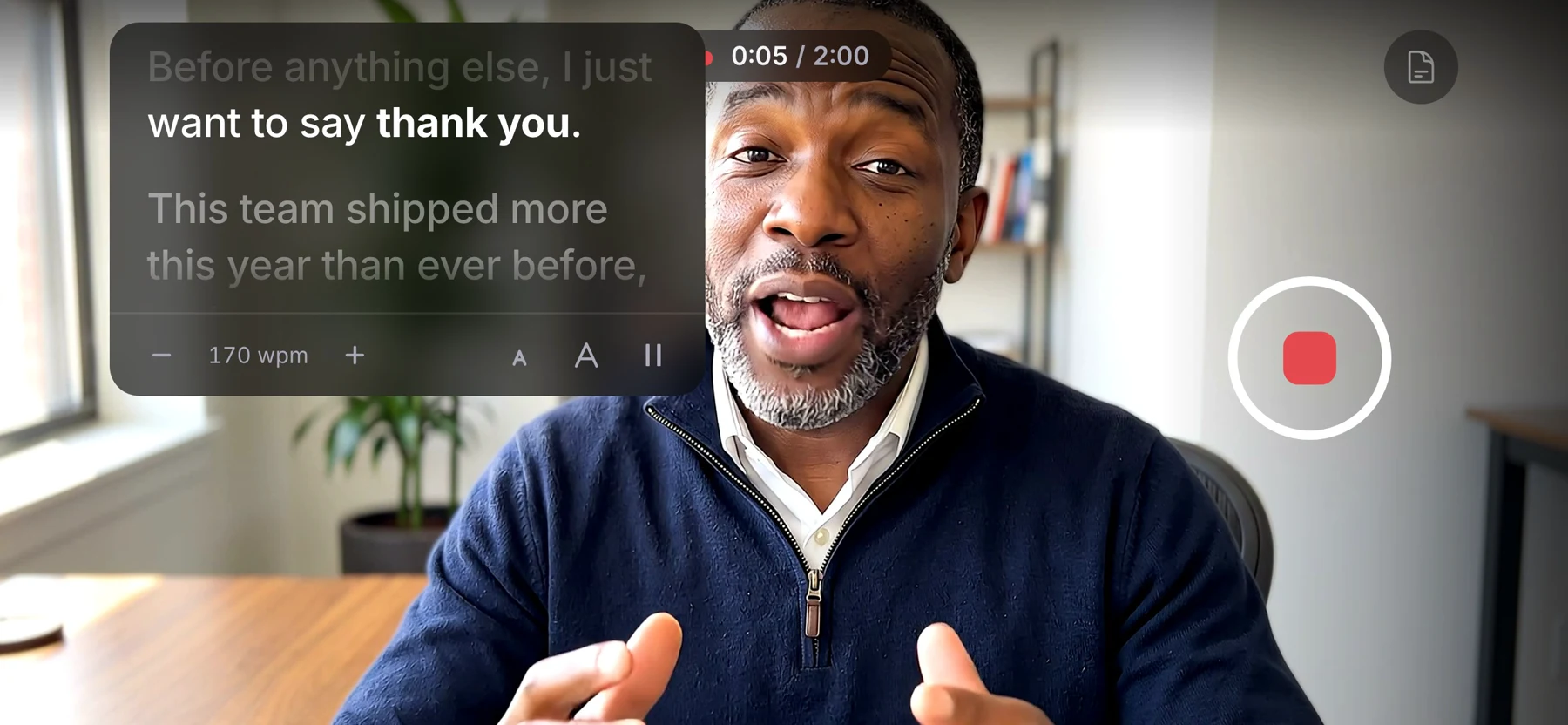
Give them the questions you’d ask on set.
Write a script or a few prompts and it scrolls beside the camera while they record, so they look at the lens instead of their notes. It never shows up in the video.
Follow up without chasing.
Set a due date and CapSend reminds everyone who hasn’t sent a video, so you aren’t asking your client to nag their own customers.
- Automatic reminders
- Two days before the due date and on the day, only to people who haven’t sent a video.
- Nudge the rest
- One button reminds everyone who’s still missing. Nobody gets more than one reminder a day.
- Email on every plan, text on Team
- Reminders go by email. Team adds text messages, which people tend to answer faster.
Up to 4K originals, plus a copy ready for the timeline.
You get the untouched file from their phone, at the resolution it recorded. Every video also comes as an H.264 MP4 at a constant frame rate, with rotation applied.

One link for your editor.
Share a project’s videos with an editor outside your agency, as one download link for the whole set.
- The link expires in 1, 7, 14, or 30 days, or never. You choose.
- Set “Deliver to an editor” on a request, and new or approved videos are shared with them as they come in.
- Originals and edit-ready MP4s by default, or originals only.
Pick a plan by how many videos you collect.
Collecting 10 testimonials for one client project this month? That fits Starter. Running several projects at once, or want text reminders? That’s Team.
Starter $59 /month
- 25 videos a month, 2 seats
- Automatic email reminders
- Your logo and color, with a small CapSend badge
Team $179 /month
- 100 videos a month, 5 seats
- Automatic email reminders
- 500 text messages a month
- Your logo and color, no CapSend badge
Need each client’s own logo on their recording pages? Create a separate organization for each client. Each organization has its own plan. See full pricing
From kickoff call to rough cut.
Your client sends the names. You run everything else.
- 1 Set up the project Create a request for the client with instructions, a script, and a due date.
- 2 Add their customers Paste the list your client sends, or import a CSV. Duplicates are merged.
- 3 Send it By email, text, or both. Or copy each person’s link and hand them to your client to send.
- 4 Let reminders run Watch statuses update live, and nudge the rest whenever you want.
- 5 Approve and hand off Approve the good takes, ask for a retake with a note, and send the set to your editor.
CapSend for other teams
- CapSend for video editors Original files, edit-ready copies, and one link for the set
- CapSend for marketing teams Scripts, reminders, and tracking for videos from busy people
- CapSend for customer marketing Customer stories and testimonials from busy B2B champions
- CapSend for customer support Testimonials and problem reports, recorded by customers
How CapSend compares
What you get from CapSend compared with the ways people send video now.
Your next client testimonial, filmed remotely.
Start a 14-day trial, set up a request for one client, and send the first link today.